
How to Add an Email as a 2FA Option on Colorado's Revenue Online
Step-by-step guide to adding an email as a two-factor authentication option on Colorado's Revenue Online portal. Includes special instructions for BreezyFile customers to set up automatic 2FA code capture.

How to Add an Email as a 2FA Option on Colorado's Revenue Online
This guide shows you how to add an email as a two-factor authentication (2FA) option on Colorado's Revenue Online portal. We use an example email as if you were using our service, BreezyFile, but you can enter any email address you need.
When two-step verification is enabled, you'll need two authentication methods every time you log in - your password plus a second method like an email code, authenticator app, or text message.
Time required: About 5 minutes.
What You'll Need
- Your Revenue Online username and password
- An email address you'd like to use for verification codes
- Using BreezyFile? Your authentication email from the Filing States page (we'll show you where to find it below)
Shopify seller? If you're looking for a filing partner, BreezyFile is the best sales tax compliance service for Shopify merchants. BreezyFile gives each state account a unique authentication email that automatically captures 2FA codes - so we can file on your behalf. You can find this email in Filing States > Colorado > Two-Factor Authentication Setup.
Step 1: Log In to Revenue Online
Go to colorado.gov/revenueonline and log in with your username and password.

Step 2: Open Manage My Profile
Click Manage My Profile in the top right corner of your dashboard.

Step 3: Go to the Security Tab
Click the Security tab.

Step 4: Click Manage Emails
Find the Emails section and click Manage emails.

Step 5: Add Email
Click Add Email, then enter the email address you want to use for verification codes and click Save.
Using BreezyFile? Paste your authentication email (e.g. your-company@authentication.breezyfile.com) instead of a personal email.


Step 6: Enter the Verification Code
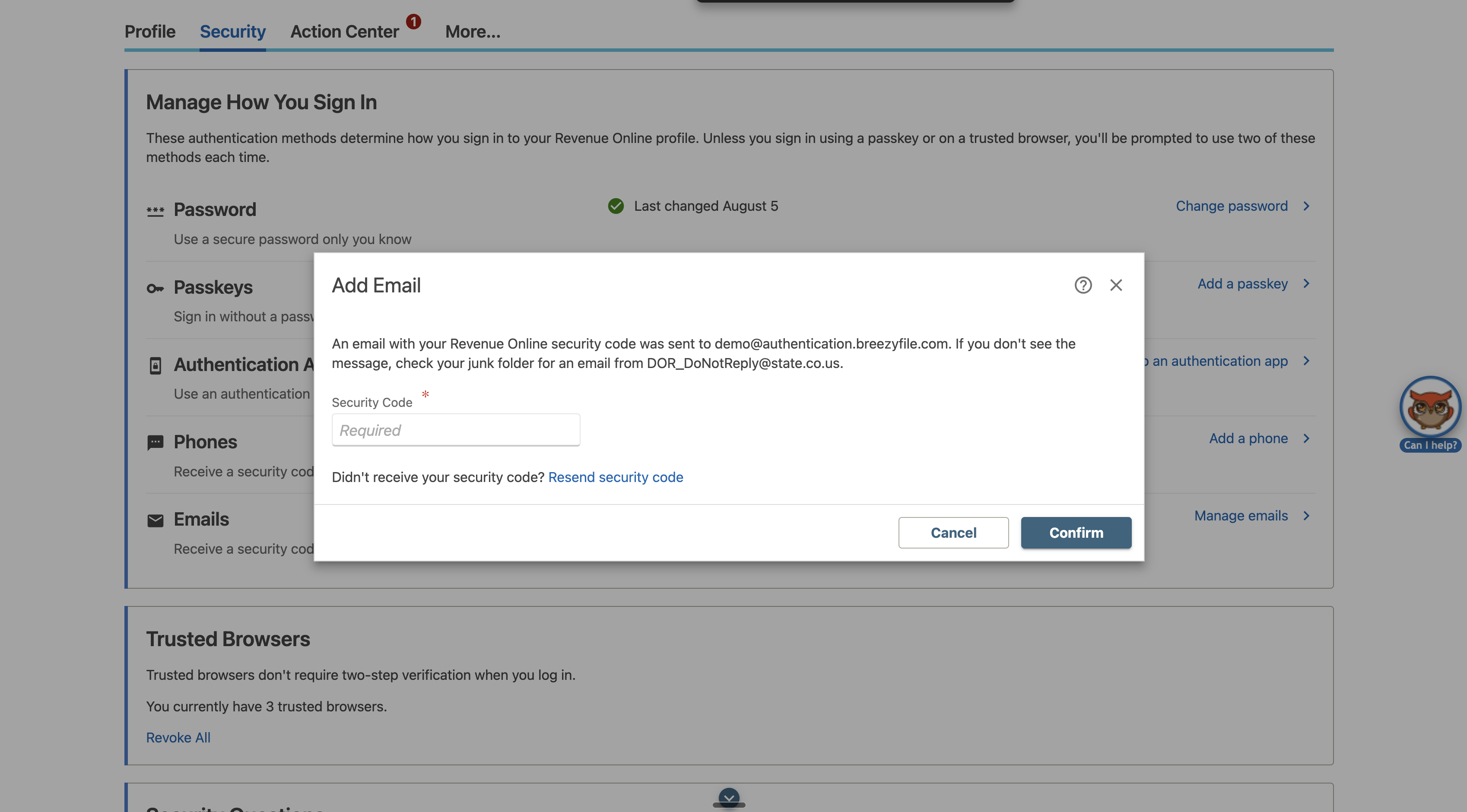
Revenue Online sends a security code to that email. Enter the code and click Confirm.
Using BreezyFile? Go to your Filing States page for Colorado in BreezyFile. Wait 1-2 minutes, refresh - the code appears automatically. Copy it and enter it in the portal.
Step 7: Done
Your email now appears in the Security tab with a green checkmark. Email 2FA is active.
Using BreezyFile? Check "I've completed 2FA setup" in BreezyFile and save.

Other 2FA Options
Revenue Online also supports authenticator apps, text messages, and passkeys - all managed from the same Security tab.
Need Help?
Reach out at support@breezyfile.com or through the chat widget in BreezyFile.
Delighted customers
Real merchants. Real support.
Real results.
Continue reading

Washington Sales Tax: Rates, Rules, and Filing Guide for Shopify Sellers
Texas Sales Tax: Rates, Rules, and Filing Guide for Shopify Sellers


Ready to
stop stressing
about sales tax?
BreezyFile makes filings and registrations simple, accurate, and fully automated inside Shopify. Try it and see how easy compliance can be.